Initial Setup
  1. Log into the computer – password is broadcast
  2. Turn on all displays. LED wall & 3 other displays (stage screen, lobby and family room)
  3. If not already running, start LightKey, PP7 & Spotify.
  1. Ensure Planning Centre & PP7 are aligned. Check for correct songs, announcements and other GC items for the day (baptism videos, child dedications etc.) Be aware of any content that requires a macro for different scene / lighting changes. Setting up PP7 for Sunday.
  2. Check that the MIDI connection is made with the Worship iPad. How to connect MIDI.
  3. Check that the network connections are made in BitFocus Companion
  4. Allow the Worship Team to run through each of their songs. If they are automated, keep an eye to make sure they run correctly and if they are manually run, try to be as confident and familiar with the song as possible. Make notes if needed.

Lorem ipsum dolor sit amet, consectetur adipiscing elit. Ut elit tellus, luctus nec ullamcorper mattis, pulvinar dapibus leo.

  1. Manage the visuals that appear on Stage, Family Room & Lobby. This includes 

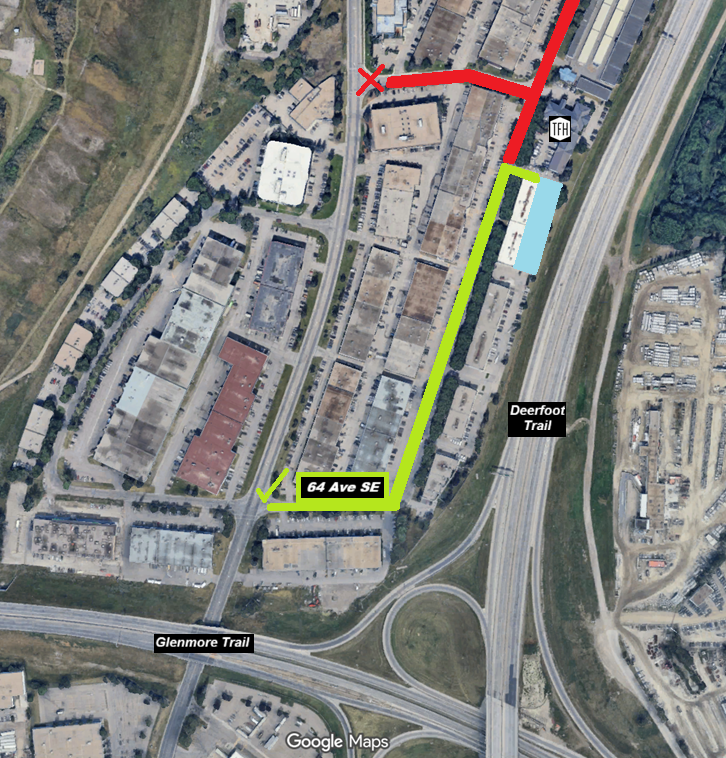
🚧 Parking Update for Sundays in September

12th St SE is under construction and the main entrance is CLOSED.

👉 From 11th St SE, turn at 64 Ave SE (not 59th ave). Follow 12th St SE to the construction fence, then turn right into the parking lot.

Our team will be there to guide you. See you at 9:30 & 11:15am on Sunday!

10:00AM SERVICE TIMES | ALL SUMMER LONG

eVERY SUNDAY
THIS SUMMER
AT 10:00AM

NEW SERVICE TIMES

9:30 & 11:15AM

STARTING SEPTEMBER 8TH, 2024